Accounts approval date: what to enter and where it appears
Short version. Enter the date the directors approved the annual accounts. It is usually the day the board reviewed the finished accounts and authorised a director to sign them. It is not automatically the accounting period end date or the filing date.
Go to the steps and entry details
On this page
1. What date to enter
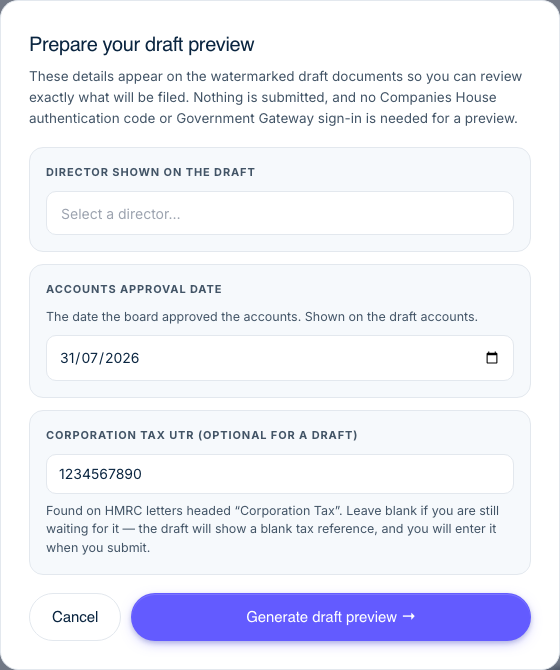
- Open Prepare your draft preview and find Accounts approval date.
- Enter the actual approval date and generate the preview.
- Check that date on the accounts. The final filing dialog offers the same date choice.
We default the field to today to save time, but you can replace it with the actual approval date. The date cannot be before the accounting period ended and cannot be in the future. Companies House confirms that the directors must approve annual accounts before they are filed in its annual accounts filing guidance.
2. Where the approval date appears
The chosen date appears beside the approving director in the full accounts sent to HMRC and in the accounts prepared for Companies House. We also show it on the watermarked draft, so you can check the date before subscribing or filing. Changing it and generating the draft again updates the draft accounts.
You choose the date in the Prepare your draft preview window and can confirm it again on the final filing screen. The date is saved with that filing, so reopening the draft restores the choice you made.
3. Why the CT600 form can show a different date
The official CT600 form has a different declaration. Box 980 records when the Corporation Tax return declaration is made, not when the annual accounts were approved. On a watermarked draft CT600, box 980 shows the date that preview was generated. On the final CT600 PDF, it shows the HMRC filing date.
It is therefore normal for the accounts approval date and CT600 box 980 to differ. We keep the two dates separate because they record two different events. You can read more about the available files in PDF copies of your filing documents.
4. Revised accounts show both approval dates
- Amendment panel: enter the new re-approval date for revised accounts.
- Preview or final filing dialog: enter the original accounts approval date from the previously filed accounts.
- Revised accounts preview: check both dates. Change the re-approval date in the amendment panel if needed.
If an amendment changes accounts already filed at Companies House, the directors must approve the revised accounts again. Enter that new re-approval date in the amendment panel. We show the same date on the draft and final revised accounts and as the signing date sent to Companies House. See how to amend a CT600 and file revised accounts.
When you prepare the preview or submit revised accounts, we also ask for the original accounts approval date. Enter the date printed on the accounts previously filed at Companies House, not the date you submitted them. We save your choice and show it separately in the revised accounts. This also applies when replacing filleted accounts with full accounts.
The original approval date cannot be before the accounting period ended, after the re-approval date or in the future. The re-approval date is shown read-only here. Change it in the amendment panel if needed. We do not ask for an original approval date for an HMRC-only amendment or an original re-filing after a Companies House rejection.
This article is general company-filing guidance. If you are unsure whether the board approved the accounts or whether revised accounts need formal approval, check your board records or ask an accountant.