File the first CT600 as new and amend the second
Short version. This option sends both CT600s: the first as a new return and the second as an amendment. It does not file accounts to Companies House. Use it when HMRC already has the second CT600 for a long accounts period, that return needs correcting, and the first has never been filed. Start from Amend filing made elsewhere.
Go to the steps and entry details
On this page
First return newSecond return amendedHMRC only
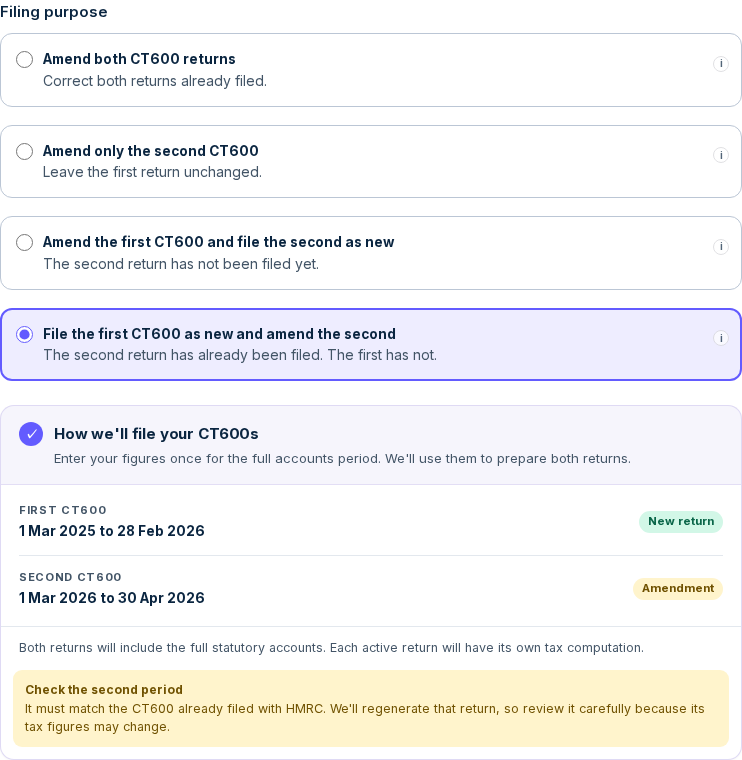
This option sends both CT600s: the first as a new return and the second as an amendment. It does not file accounts to Companies House.
- Both returns are sent. This is not a first-return-only filing.
- For a company, both returns include the same full statutory accounts when they overlap the accounts period. If the second return falls wholly after the accounts end, it keeps the existing accounts-omission explanation instead. Each active return has its own tax computation.
- The second return is regenerated from your prepared figures. Review its figures even if the earlier filing was nil.
Is this the right option for you?
Use it if all of these are true
- Your accounts period ends more than 12 months after it starts, even by one day, and no more than 18 months after it starts.
- Your Corporation Tax coverage produces two returns, neither longer than 12 months.
- HMRC already has the second CT600, which needs correcting. The first has not been filed.
Do not use it if
- Neither CT600 has been filed.Use instead: Standard return
- Only the first CT600 has been filed and needs correcting.Use instead: Amend the first and file the second
- Both have been filed.Use instead: Amend a CT600
Common mistake: choosing to amend both returns
An amendment replaces a return HMRC already holds. It cannot supply an original that has never been filed. Changing the filing type does not change the calculated tax, so check the dates and New or Amendment status as well as the total.
Amend both
- First return
- Amendment, with no original to replace
- Second return
- Amendment
- Calculated tax for this example
- £1,733.75
File the first and amend the second
- First return
- New return
- Second return
- Amendment
- Calculated tax for this example
- £1,733.75
Fictional worked example
- Company
- Hornbeam Example Ltd
- Accounts period
- 31 May 2025 to 31 May 2026
- First CT600
- 31 May 2025 to 30 May 2026. Never filed
- Second CT600
- 31 May 2026 to 31 May 2026. Filed, but needs correcting
- Prepared full-period figures
- Turnover £142,350, staff costs £54,750, other charges £78,475
The company and all figures on this page are fictional.
Before you start
Have your full accounts dates, the dates of both Corporation Tax returns and your prepared figures ready. Check the second period against the CT600 already filed. We trust the dates and figures you enter.
HMRC usually allows an amendment within 12 months after the filing deadline. We do not impose a locally calculated deadline. HMRC decides whether it can process each return. HMRC amendment guidance
Step by step for a micro company
On the company record choose Amend filing made elsewhere. The example uses Enter my figures once. If you choose Enter figures separately, enter the exact prepared figures on each CT600 tab instead. Separate figures guide
Company Profile & Period
- Accounting period
- 31 May 2025 to 31 May 2026A note headed Extended accounting period. confirms that two returns will be prepared.
- Special tax regimes
- No
- What are you filing?
- HMRC CT600
- Filing purpose
- File the first CT600 as new and amend the second
- My HMRC Corporation Tax period is different from my statutory accounts period.
- Leave untickedTick it only if HMRC’s Corporation Tax period starts on a different date from your accounts.
- Change CT600 split date
- Leave as shownThe dates show as 31 May 2025 to 30 May 2026 · 31 May 2026 to 31 May 2026. Open it only if HMRC's first return ends on a different date.
- Trading status
- ActiveThe form starts on Dormant, so make sure you change it.
- How do you want to enter your figures?
- Enter my figures onceChoose Enter figures separately only if you have your own figures for each return. Separate figures
- What the company does
- Trading
Click Next →.
Financial Data
Enter the figures for the whole accounts period. Do not split them yourself.
- Previous year
- Last year’s figures, from your previous accountsRequired before you continue. Figures from Companies House fill in where available. Check them, and enter 0 where a line had no amount.
- Turnover
- 142350Box 145
- Cost of raw materials and consumables
- 0
- Staff costs
- 54750
- Other charges
- 78475
- Company tax type
- Standard companyFor a long period it is labelled “Company tax type (both returns)”.
- Balance sheet
- Your balance sheet at the end of the accounts period
- Average number of employees
- Your average number, or 0
If a dividend, gain or capital purchase belongs to one date, an allocation panel asks which return it belongs to. Click Next → when every section is complete.
More help: Amounts that belong to one date
Review & file
The Corporation tax due card shows the total for both returns. For Hornbeam Example Ltd:
Corporation tax due£1,733 .75On taxable total profits of £9,125 at 19.0% · small profits- Reason for amendment
- Your reason for correcting the second return. Save it before continuing.
- Optional
- Click Preview your documents (free) to check both returns first
- Subscribe
- Click Unlock Filing and complete payment
- Continue
- Click Continue to submission
Filing credentials
- Corporation Tax UTR
- Your 10-digit UTR
- Gateway User ID
- Your Government Gateway user ID
- Gateway Password
- Your Government Gateway password
- Select the director submitting this return
- The director’s name
- Accounts approval date
- The date the directors approved the accountsWhat to enter
- Declaration
- Tick it
Click Submit to HMRC.
More help: If HMRC rejects your sign-in details
After you submit
Under Gateway submissions, the filing page lists both returns, the first marked as a new return and the second as an amended return, for example "Return 1 of 2". Each shows Accepted once HMRC confirms it. HMRC usually replies within a few minutes, but it can take longer.
Each return has its own Corporation Tax payment deadline. The Review & file page shows the dates.
More help: Filing statuses explained · Deadlines for two returns · Paying your Corporation Tax
Charities and clubs
The supported full-exemption CT600E route offers the same filing purpose. Enter the required CT600E figures and allocations for both returns. Your uploaded accounts accompany both and no tax computation is required for full exemption. Charity filing guide
An unincorporated club chooses this purpose in Club details and period. Supply your prepared taxable figures or exemption treatment for each return using the existing club controls. Uploaded accounts accompany both returns. If you choose the existing accounts-omission option, your explanation accompanies the returns instead. Club filing guide
With Enter my figures once, recurring figures are shared by days and amounts on allocation panels follow your entered allocations. Moving either period requires you to review those allocations. With separate entry, each return uses the figures you enter for it. How amounts are allocated
Check both returns
On review, check HMRC returns to file. The second period must match the CT600 already filed. Review both documents before approving. After submission, check each HMRC result separately. Acceptance of one does not mean both were accepted. There is no selective automatic retry.
Selecting Companies House clears this purpose. If you subsequently file both CT600s to HMRC, both are amendments. Review the changed package before submitting.
Open the guide for the option that matches your filings.
Looking for a different field or step? See all filing wizard guides →
Official sources
- GOV.UK: accounting periods
- GOV.UK: amend a Company Tax Return
- HMRC: long-period accounts and computations, page 4
Whether this route matches your filings is for you to decide, yourself or with your accountant.
Example companies and figures are fictional. Field names match the filing wizard as of 15 October 2026.