Prior year adjustments in micro-entity accounts: restated comparatives and the As restated label
Short version. Include a prior year adjustment note prints your own wording as the last numbered note in the accounts, and Show “As restated” on the previous year column prints As restated under the previous year date. Neither changes a figure, an earlier filing or a Corporation Tax return. Use them when you have corrected last year's figures in this year's FRS 105 micro-entity accounts. Both are on Financial Data, in Optional notes to the accounts, and appear only when the accounts have a previous year column.
Go to the steps and entry details
On this page
FRS 105 micro-entity accountsPrevious year columnOptionalWhere you see it: Financial Data › Optional notes to the accounts
Include a prior year adjustment note prints your own wording as the last numbered note in the accounts, and Show “As restated” on the previous year column prints As restated under the previous year date. Neither changes a figure, an earlier filing or a Corporation Tax return.
- The corrected previous year figures go in the Previous year column. The note and the label do not change any figure.
- The two choices are independent. You can use either, both or neither. A ticked note with no text prints nothing.
- The note is printed in both copies of the accounts, including the copy filed at Companies House. By default that copy leaves out the profit and loss account, but the note is still included. Anything you write in it is published.
- Neither choice changes the accounts already on the Companies House register for last year, or any earlier CT600. Replacing last year's accounts is a separate action. Revised accounts at Companies House
- Whether to restate, and what to say about it, is for you or your accountant to decide. This guide explains what the software files.
Is this the right option for you?
Use it if all of these are true
- We are generating this year's FRS 105 micro-entity accounts for you.
- The accounts have a previous year column, so they are not the company's first accounts and you have not said that there are no prior year figures.
- You have entered corrected figures for the previous year and want the accounts to explain or label them.
Do not use it if
- You want to replace the accounts already filed for last year rather than correct the comparatives this year.Use instead: Revised accounts at Companies House
- You only need to fix a previous year figure or date that was filled in wrongly.Use instead: Correcting prior-year figures and dates
- You want a going concern note, an off balance sheet disclosure or a directors’ advances note.Use instead: Going concern and off balance sheet notes
What FRS 105 and the regulations say
FRS 105 paragraph 8.16 says a micro-entity corrects a material prior period error, to the extent practicable, in the first accounts approved after it is found, by restating the comparative amounts for the earlier period in which the error happened. If the error happened before that earlier period, the opening balances of the earliest period shown are restated instead. Paragraphs 8.14 and 8.15 say what counts as a prior period error, and paragraph 8.17 covers the case where the effect on a particular period cannot be worked out.
FRS 105 does not require a note about the correction. Paragraph 6.1 permits, but does not require, extra disclosures, and paragraph 1.3 says that a micro-entity including extra information has regard to any related requirement in Section 1A of FRS 102. Schedule 1 paragraph 7(2) of the small companies accounts regulations asks for a note when a comparative amount is adjusted, but regulation 5A of those regulations says that nothing in their Schedules 1 to 3 requires a micro-entity's accounts to contain notes, except the information in paragraph 57 (commitments and guarantees). That makes the paragraph 7(2) note optional for a micro-entity, which is why both choices here are optional.
Regulation 5A covers only those Schedules. Notes required elsewhere still apply to micro-entity accounts, such as the average number of employees, directors' advances, credits and guarantees, and material off balance sheet arrangements (FRS 105 paragraph 6.2). The notes FRS 105 requires
The February 2026 FRC amendments apply to FRS 105 accounting periods beginning on or after 1 January 2026. They do not change paragraphs 1.3, 6.1 or 8.14 to 8.17.
Common mistakes
Ticking As restated without changing the figures
Show “As restated” on the previous year column only adds words to the heading. If you leave last year's figures as they were filed, the column says As restated over figures that were not changed. Enter the corrected figures in the Previous year column first.
Expecting the note to change last year's filing
The note is part of this year's accounts. The accounts on the register for last year stay as they were filed. If you decide last year's accounts must be replaced, that is the revised accounts route. Revised accounts at Companies House
Looking for the choices on first accounts
First accounts have no previous year column, so neither choice is shown. The same applies when you have said that the accounts have no comparative figures. Anything you saved earlier is kept and comes back if a previous year column returns. Check that the wording still describes the right year.
Worked example
- Company
- Rowan Example Ltd, a micro-entity
- This year’s accounts
- 1 April 2025 to 31 March 2026
- Found this year
- An accrual of £1,000 was left out of the accounts to 31 March 2025
- Previous year as filed
- Creditors due within one year £2,000, net assets £6,000
- Previous year as corrected
- Creditors due within one year £3,000, net assets £5,000
- Note wording
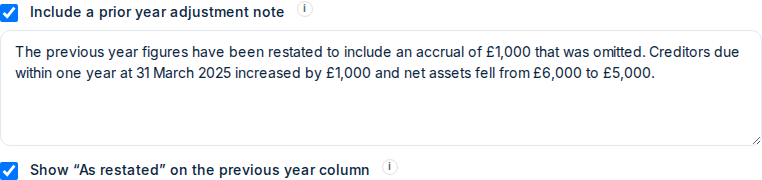
- The previous year figures have been restated to include an accrual of £1,000 that was omitted. Creditors due within one year at 31 March 2025 increased by £1,000 and net assets fell from £6,000 to £5,000.
The company and all figures on this page are fictional.
Before you start
- Corrected previous year figures
- From your restated accounts or your accountant
- Your note wording
- Optional. Up to 4,000 characters
- Companies House authentication code
- Only if you are filing the accounts there too. Where to find it
The company and all figures on this page are fictional.
Step by step
Start a new filing
- Dashboard, company card
- Click New filing. If you see Resume filing, click the small arrow beside it and choose Start new filing →
- Confirm the company
- Tick the confirmation box, then click Continue with this company →
Company Profile & Period
- Accounting period
- 1 April 2025 to 31 March 2026
- What are you filing?
- Companies House & HMRC CT600 or Companies HouseHMRC CT600 also attaches the accounts to the CT600, so the note and label appear there too.
Click Next →.
Financial Data
- Previous year
- The corrected previous year figures, for example creditors due within one year of £3,000Figures filled in from last year’s Companies House accounts are the figures as filed. Overwrite each line you have corrected.
- Optional notes to the accounts
- Open the card
- Include a prior year adjustment note
- Tick it, then type your wording in the box that appearsLeave it unticked for no note.
- Show “As restated” on the previous year column
- Tick it if you want As restated under the previous year dateIndependent of the note.
Click Next → when every section is complete.
Review & file
- Check the accounts
- Click Preview your documents (free) and check the previous year column heading and the last numbered note
- Subscribe
- Click Unlock Filing and complete payment
- Continue
- Click Continue to submission
Filing credentials
- Authentication code
- Only shown if you are filing the accounts at Companies House
- Accounts approval date
- The date the directors approved this year’s accountsWhat to enter
- Declaration
- Tick it
Click Submit to HMRC & Companies House or the submit button shown for your filing.
After you submit
The accounts show Accepted once Companies House accepts them. That can take a few days.
More help: Filing statuses explained
What the note prints
Your wording is printed as the last numbered note in Notes to the Accounts, after any other notes you added, under the heading Prior year adjustment. Line breaks you type are kept. The note appears in the full accounts sent to HMRC and in the Companies House copy. In the iXBRL file it is tagged as the FRC concept for a general description of prior period adjustments and their effect.
What As restated prints
The words As restated are printed on a second line under the previous year date in the column heading. They appear on the balance sheet and, where it is included, the profit and loss account. The Companies House copy leaves out the profit and loss account by default, so there they appear on the balance sheet only. If you choose to publish the profit and loss account, they appear on both. Choosing what Companies House publishes The label is text only. It adds no iXBRL tag and changes no figure.
More help: What iXBRL accounts contain · Other optional notes
Accounts periods over 12 months
One set of accounts is generated for the accounts period, with the note and the label, and the same accounts are attached to each CT600 the filing produces. When your Corporation Tax dates produce two CT600s, for example an accounts period that ends more than 12 months after it starts, even by one day, both CT600s receive identical accounts. When your Corporation Tax period is shorter than a long accounts period, the filing can have one CT600 with those accounts attached. There is nothing to divide between returns. This also applies when you enter separate figures for the accounts and each CT600.
More help: Filing a long first period · Separate accounts and CT600 figures · Corporation Tax dates different from your accounts
Check the result
Not the right option?
Open the guide for the option that matches your filings.
Looking for a different field or step? See all filing wizard guides →
Official sources
- FRC, FRS 105 current edition and amendments (September 2024 edition, paragraphs 1.3, 6.1 and 8.14 to 8.17)
- SI 2008/409, regulation 5A: micro-entities, notes to the accounts
- SI 2008/409, Schedule 1 (paragraph 7: corresponding amounts)
Whether this route matches your filings is for you to decide, yourself or with your accountant.
Example companies and figures are fictional. Field names match the filing wizard as of 13 October 2026.