How to set up a CT600 or Companies House filing
Short version. Set up an HMRC CT600 or Companies House filing using your accounts dates and filing history. An HMRC CT600 is your company’s Corporation Tax return. Statutory accounts are its annual accounts. Keep the full statutory accounts dates when filing an HMRC CT600. The questions can set up both returns, an outstanding first or second return, a supported correction, different HMRC dates or Companies House accounts only.
On this page
CT600 or accountsReview before applyingWhere you see it: Company Profile & Period › Need help setting up your filing?
Set up an HMRC CT600 or Companies House filing using your accounts dates and filing history.
- Find Need help setting up your filing? below What are you filing?. You can continue with your existing controls without opening it.
- The questions name the HMRC CT600 part separately from Companies House accounts. Your proposed settings show what will be filed to each destination. You can edit the destination before applying. Cancel keeps your original settings.
- Applying sets up a draft. It does not submit to HMRC or Companies House. Corrections open in the same tab and still need review, reasons and approval.
- The helper covers ordinary limited-company filings. Charity, members-club and CIC routes keep their existing controls. When the first CT600 is outstanding and the second is already filed, the helper prepares both returns, with the second sent again as an amendment.
When to use the questions
Use it if all of these are true
- You know whether you need a CT600, Companies House accounts or both, but need help setting the filing route.
- You can provide the accounts dates and say what was already filed.
Do not use it if
- You already know the settings you need.Continue using the normal filing controls.
- A filing is still waiting for a response or was rejected.Use instead: Open and re-file an existing filing
Keep accounts dates separate from CT600 dates
A long accounts period can produce two CT600s. A short second return does not make the full statutory accounts period shorter. The helper shows the accounts and CT600 dates together so you can choose what to file.
Only the second CT600 dates entered as accounts
- Accounts context
- The full accounts period is missing
- Result
- The wrong accounts context
Full accounts dates kept
- Filing choice
- The outstanding second CT600
- Result
- One CT600 with the right accounts context
The accounts period is the full period covered by your prepared annual accounts. First accounts start on the incorporation date. Later accounts normally start the day after the previous accounts ended. Companies House company information and filing history can help you find these dates. Suggestions can include derived older periods, so use your correct historical accounts period if it is not listed.
A missing dropdown period means you can enter custom accounts dates. For a long first year, the individual HMRC CT600 periods really are shorter than the Companies House accounts period. Choose HMRC gave me different dates for my CT600 to check or enter the HMRC dates. We prefill the dates and show both returns. Keep matching dates, or change the first start, first return end or last end. If the returns together cover the full accounts period, the helper uses the regular long-period route. If the HMRC coverage differs, it keeps the different-date settings. In Enter my figures once mode, the helper proposes HMRC only and explains that any Companies House accounts need a separate filing. A draft already using Enter figures separately can keep both destinations for a supported date combination. The full statutory accounts period stays separate.
Before you start
- Have ready
- Full statutory accounts dates, Corporation Tax dates and the status of earlier filings.
- If the first CT600 is already filed
- Know whether it included the full statutory accounts, and where it was filed.
- If dates are unlisted
- You can enter them. Companies House suggestions do not override your dates.
The company and all figures on this page are fictional.
Step by step
Company Profile & Period
- Need help setting up your filing?
- Open the questions below your destination choices.
- Which HMRC CT600 return(s) do you need to file?
- Two HMRC CT600 returns for accounts covering more than 12 months, The second HMRC CT600 return, with the first already filed, The first HMRC CT600 return, with the second already filed, One HMRC CT600 return for accounts of 12 months or less, HMRC gave me different dates for my CT600 or I’m not sure. Companies House only skips CT600 questions.
- Select the statutory Companies House accounts dates
- Select the full statutory accounts period from the dropdown. If it is missing or needs correcting, choose Enter custom accounts dates to show the editable start and end dates. Review the paired HMRC CT600 dates. A contradictory one-return or two-return choice must be corrected before filing-history questions appear.
- Filing history
- Answer only the questions shown. Accepted, rejected, pending and unknown are different answers. For corrections, say whether the accepted filing was made here or elsewhere. The filing-history link appears when an answer needs checking, or no accepted filing is found. You can answer the other questions here.
- Apply settings
- Read the proposed destination, returns and accounts treatment, then apply. For settings applied to this draft, the questions are replaced by Filing settings applied. Focus moves to this summary, showing the destination and accounts and HMRC CT600 dates. Review the settings below, then select Save Progress or Next to save them to your account. Nothing has been submitted. Editing a setting or reopening the questions clears the summary. If something is missing, fix the visible answer first. Each option and question has a help icon explaining its meaning. Opening help does not select an option.
The help icon beside Proposed settings explains the actual proposed filing. It tells you which returns or accounts will be prepared, what stays unchanged and what will not be sent. It links to the relevant step-by-step guide, a related explanation and official guidance. For example, the first-amended and second-new proposal links to both the filing steps and the article explaining the full statutory accounts. Opening help does not apply settings or change an answer.
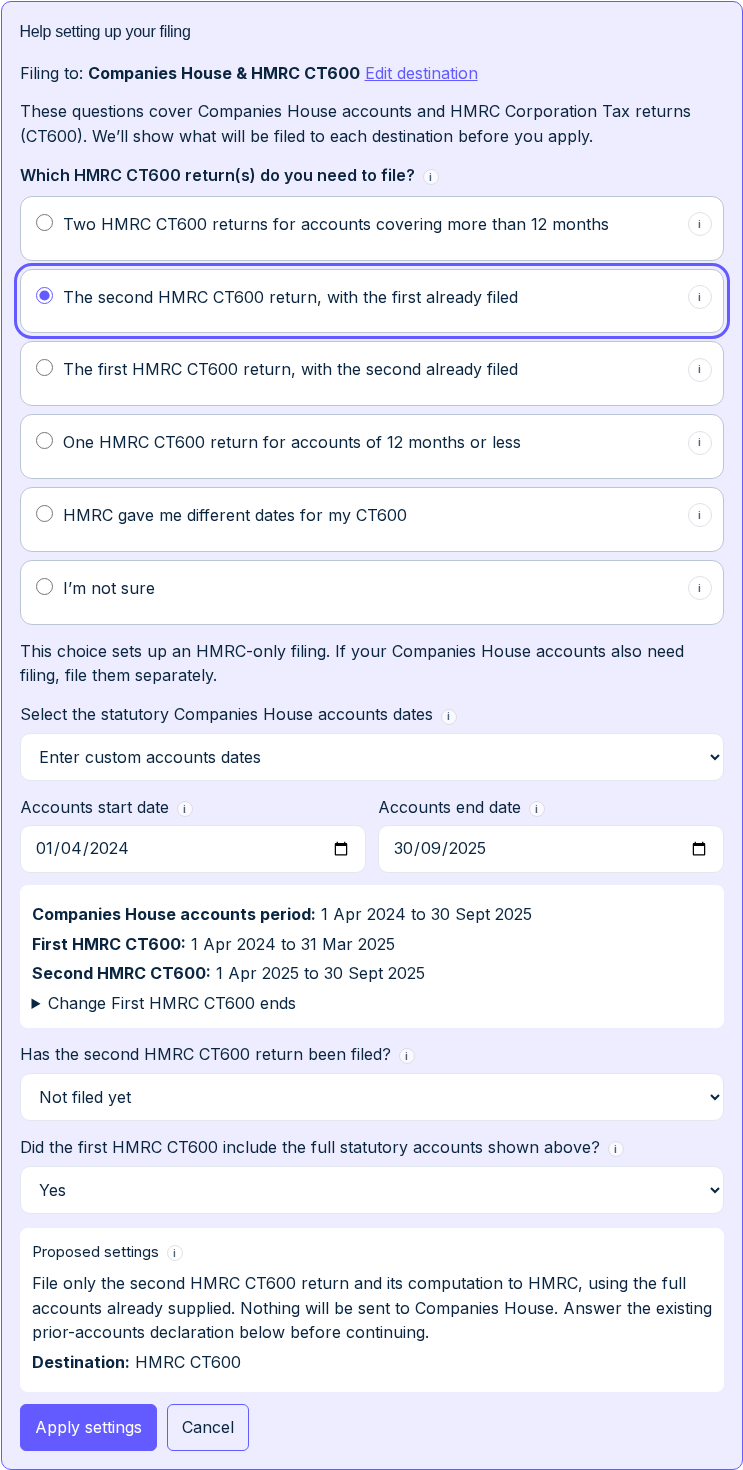
Two CT600s and an outstanding second return
For both new CT600s, keep the full accounts period. Enter figures once and use the existing controls to allocate donations, gains, dividends and capital amounts to the returns. Or choose Enter figures separately and enter each return’s figures directly. Review both computations and the accounts before filing.
For a new second return, if the accepted first return included the full accounts, the helper selects File only the remaining CT600 and HMRC CT600. Answer the existing prior-accounts declaration yourself. If you previously chose separate figures, applying this route asks before clearing those CT600 entries and keeping your statutory accounts figures and shared loans. Then enter only the remaining return’s figures in the normal financial fields. No accounts are generated again and nothing is sent to Companies House.
If the first return did not include the full accounts and was filed elsewhere, the supported route amends the first CT600 and files the second as new, with the full accounts. It requires accounts over 12 and no more than 18 months and valid dates for two returns. The shared filing checks still apply. To enter the first return’s figures as filed, choose Enter figures separately when offered. If Companies House accounts also need filing, make a separate Companies House filing.
If HMRC already has the second CT600 and the first has never been filed, choose The first HMRC CT600 return, with the second already filed. Answer the second-return status and where it was filed. For a second return filed elsewhere, the helper selects File the first CT600 as new and amend the second and HMRC only. It sends the first as new and the second again as an amendment, even if unchanged. Both tick box 50 to tell HMRC that more than one return is being made at the same time. Full accounts accompany each return that overlaps them. A return wholly after the accounts end carries the existing explanation instead. To keep the second return’s figures exactly as filed, choose Enter figures separately when offered. File the first CT600 as new and amend the second
Corrections and rejected filings
An accepted return that needs changing is a correction. An accepted return can stay unchanged on the remaining-second-return route. On the first-new and second-amended route, the second return is always sent again, even if its figures are unchanged. A rejected return needs the existing original re-file journey. A pending filing needs its response checked first. Empty history does not mean nothing was filed.
A second-only correction requires the full accounts already supplied with the first return. Without that fact, the helper cannot select a second-only correction. It does not fall back to amending both. The helper does not prepare a mixed first-amended and second-new filing for an in-service original, or a partial in-service amendment. Use the existing amendment controls on an accepted filing for supported in-service corrections.
For supported corrections, one Apply action saves your current source answers to your account and opens the prepared correction in this tab. The source remains available through saved progress. A save failure leaves you here so you can retry.
If you reopen the questions on a correction and choose new returns, applying saves the correction separately and changes this tab to a new filing. Your current figures, allocations and trading status are kept. The page stops showing an amendment. If saving fails, the correction stays open and you can retry. Choosing a filed-elsewhere correction also keeps your selected trading status. Review that status before continuing.
Example: first CT600 accepted with full accounts
- Company
- Linden Example Ltd
- Statutory accounts
- 31 May 2025 to 31 May 2026
- Outstanding second CT600
- 31 May 2026 to 31 May 2026
The company and all figures on this page are fictional.
Other filing options
Open the guide for the option that matches your filings.
Looking for a different field or step? See all filing wizard guides →
Official sources
- GOV.UK: Corporation Tax accounting periods
- GOV.UK: first company accounts and tax returns
- HMRC: full accounts to be delivered
- HMRC: accounts and the return period
- HMRC: completing a Company Tax Return
More help: Which CT600 filing option do I need?
Whether this route matches your filings is for you to decide, yourself or with your accountant.
Example companies and figures are fictional. Field names match the filing wizard as of 16 October 2026.