What are you filing? HMRC, Companies House, or both
Short version. What are you filing? decides where this filing is sent: HMRC CT600 sends only the Corporation Tax return to HMRC, Companies House sends only the annual accounts to Companies House, and Companies House & HMRC CT600 sends both. You choose where to file, review the documents, enter your own credentials and select Submit. The platform then sends the filing automatically. Support staff do not submit it manually.
Go to the steps and entry details
On this page
HMRC, Companies House or bothAny period up to 18 monthsWhere you see it: Company Profile & Period › What are you filing?
Before entering figures, the filing setup questions can set the existing destination and CT600 route for an ordinary limited company. They keep the full accounts dates beside the CT600 dates. You can also continue with the controls below without opening the questions.
What are you filing? decides where this filing is sent: HMRC CT600 sends only the Corporation Tax return to HMRC, Companies House sends only the annual accounts to Companies House, and Companies House & HMRC CT600 sends both.
- The form starts on Companies House & HMRC CT600. If you only need one side, change it before you continue.
- With HMRC CT600, HMRC still receives your accounts and tax computation, because they are part of the Corporation Tax return. Nothing goes to Companies House.
- With Companies House, no CT600 is filed. Filing purpose is not shown, because it only applies to CT600s.
- Choosing HMRC CT600 for a period marked (accounts filed) is a normal choice. That label describes Companies House records, not whether HMRC has a CT600. Filing only the CT600
- When your accounts period ends more than 12 months after it starts, even by one day, HMRC needs two CT600s and Companies House needs one set of accounts for the whole period. How the dates are split
What gets filed where
A company's annual filing has two separate destinations. They are two independent submissions to two different organisations, so they can be sent together or separately.
- HMRC
- Your CT600 Corporation Tax Return, with the full accounts and the tax computation in iXBRL. For an accounts period over 12 months, two CT600s, each with the full accounts.
- Companies House
- Your Annual Accounts (iXBRL), in the version intended for the public register. One set for the whole accounts period, even when it is longer than 12 months. What goes on the public record
The company and all figures on this page are fictional.
You enter your own Government Gateway details for HMRC and your company authentication code for Companies House. You do not give those details to a member of the support team by email.
To file to Companies House and HMRC together with different Corporation Tax dates, choose Enter figures separately. The entry guide explains the accounts and CT600 steps.
More help: GOV.UK: accounts and tax returns for private limited companies · GOV.UK: Company Tax Returns
Choose when you start
In step 1, under Accounting period, choose the period you are filing. Then find What are you filing? and choose your destination. Your choice determines which documents the platform prepares, which checks it runs and which credentials it asks for at the end.
Select the help icon beside Accounting period for guidance on choosing your full accounts period, using Custom dates and reading the (accounts filed) label. For accounts longer than 12 months, choose the full accounts period rather than just one CT600 period. The help icon beside What are you filing? links back to this guide.
To edit the address on your submitted return, select Edit Office Address in the company details. The help icon beside it explains that this does not change your registered office at Companies House. To change that registered office, file form AD01 with Companies House.

Just the CT600 to HMRC
HMRC CT600 sends only your Corporation Tax return to HMRC: the CT600 with your accounts and tax computation. It does not file, change or resend anything at Companies House.
- The card reads Corporation Tax return only. That means only HMRC receives it. The accounts still go to HMRC inside the return.
- At the end you enter your UTR and Government Gateway details. No authentication code is asked for.
- Use it when your accounts are already at Companies House, filed with us or elsewhere, or when you file them there separately.
- To file only the second CT600 of a long period, choose this card and then File only the remaining CT600. That option does not attach accounts. Why HMRC accepts that
Just the accounts to Companies House
Companies House sends only your annual accounts to Companies House. It does not file a CT600 or send anything to HMRC.
- The card reads Annual accounts only. At the end you enter your 6-character company authentication code.
- Use it when your CT600 is already filed or is not due yet. Most companies still owe HMRC a CT600 as well, so filing accounts alone does not meet that obligation.
- For an accounts period over 12 months, Companies House receives one set of accounts for the whole period.
Both, in one go
Companies House & HMRC CT600 sends your annual accounts to Companies House and your Corporation Tax return to HMRC, prepared from one set of figures.
- The card reads Accounts + Corporation Tax return. It is what most people need for a period where nothing is filed yet, and it is what the form starts on.
- The two submissions are sent one after the other. Check each authority's response separately.
- Do not use it for a period whose accounts are already at Companies House. See the common mistake
The underlying figures stay consistent whichever you choose. HMRC receives the CT600, full accounts and tax computation, while Companies House receives the statutory accounts version intended for the public register.
Some filings go to HMRC only through this service: a one-day return, a charity claiming exemption on CT600E, an unincorporated club and a community interest company. A community interest company files its accounts and CIC34 report with Companies House separately. Companies House only builds the ZIP for a CIC, so you can generate the package on its own. If the CT600 is still due, you can file it with HMRC only from the same filing. CIC accounts and the CIC34 report
Common mistake: leaving the default on when the accounts are already filed
The form starts on Companies House & HMRC CT600. If Companies House already has accounts for the period you chose, leaving that default on sends the accounts to Companies House a second time. The Corporation Tax is the same either way. Only what goes to Companies House changes. When you pick a period marked (accounts filed) with that default on, the wizard shows Companies House records show accounts filed for this period. under the period.
Companies House & HMRC CT600 left on (accounts already filed)
- Sent to HMRC
- CT600, accounts and tax computation
- Corporation Tax
- £5,700
- Sent to Companies House
- The same accounts again
HMRC CT600 chosen
- Sent to HMRC
- CT600, accounts and tax computation
- Corporation Tax
- £5,700
- Sent to Companies House
- Nothing
Already filed one side? File just the other
A common case: “We’ve already filed our accounts to Companies House and just need to send the CT600 to HMRC. Is that possible?” Yes. You file only the outstanding side:
- Accounts already done, file the CT600: under Accounting period, choose the period your CT600 covers. This is normally the one marked (accounts filed). You can also use Custom dates. Then under What are you filing?, choose HMRC CT600. The accounts-filed label describes Companies House records, not HMRC filing history. Nothing is sent to Companies House.
- CT600 already done, file the accounts: choose Companies House. Nothing is sent to HMRC.
This works whether the other side was filed through #Simple CompanyTax or elsewhere, for example by your accountant. You are simply not re-sending the part that is already done. Your choice is remembered if you save and come back later.
For a CIC, Companies House builds the accounts and CIC34 ZIP for you to submit to Companies House yourself. You can do this before filing the CT600, then choose HMRC only from the same filing later. Get the CIC package before HMRC.
File only the remaining CT600 needs HMRC CT600
File only the remaining CT600 sends the second CT600 of a long accounting period, using Corporation Tax dates that differ from the accounts dates. With Enter my figures once, a filing on different Corporation Tax dates can only go to HMRC. If you choose Companies House & HMRC CT600 and that option, the wizard stops when you click Next → and shows To send accounts to Companies House with different Corporation Tax dates, choose Enter figures separately, or file to HMRC only. Choose HMRC CT600 to continue. File the accounts with Companies House as their own filing if they are not there yet.
More help: File only the remaining CT600 · Which filing option do I need?
Worked example
- Company
- Sycamore Example Ltd
- Accounts period
- 1 January 2025 to 31 December 2025 (12 months)
- Companies House
- Accounts for these dates already filed by the company’s accountant
- HMRC
- No CT600 filed for these dates yet
- Figures from the approved accounts
- Turnover £96,000, raw materials £12,000, staff costs £30,000, other charges £24,000
The company and all figures on this page are fictional.
Before you start
- Your approved accounts
- The figures and balance sheet are entered from them. The accounts HMRC receives are built from what you enter.
- Accounts approval date
- The date the directors approved those accounts. What to enter
- Company UTR
- Ten digits, on letters from HMRC. Where to find your UTR
- Government Gateway details
- The user ID and password for your company's HMRC account. Setting up a Government Gateway account
- Companies House authentication code
- Only if you choose Companies House as well. Where to find it
The company and all figures on this page are fictional.
Step by step
Start a new filing
- Dashboard, company card
- Click New filing. If you see Resume filing, click the small arrow beside it and choose Start new filing →
- Confirm the company
- Tick the confirmation box, then click Continue with this company →
Company Profile & Period
- Accounting period
- 1 January 2025 to 31 December 2025 (accounts filed)The label means Companies House has these accounts. It says nothing about HMRC.
- Special tax regimes
- No
- What are you filing?
- HMRC CT600The form starts on Companies House & HMRC CT600, so make sure you change it.
- Filing purpose
- Standard returnFor a 12-month period the other option is greyed out.
- My HMRC Corporation Tax period is different from my statutory accounts period.
- Leave untickedTick it only if HMRC’s Corporation Tax period starts on a different date from your accounts.
- Trading status
- ActiveThe form starts on Dormant, so make sure you change it. Choose Dormant only if the company had no income or transactions in the period. Dormant and trading periods
- What the company does
- Trading
Click Next →.
Financial Data
Enter the figures from the approved accounts for the whole period.
- Previous year
- Last year’s figures, from your previous accountsRequired before you continue. Figures from Companies House fill in where available. Check them, and enter 0 where a line had no amount.
- Turnover
- 96000Box 145
- Cost of raw materials and consumables
- 12000
- Staff costs
- 30000
- Other charges
- 24000
- Company tax type
- Standard company
- Balance sheet
- Your balance sheet at the end of the periodStill needed, because HMRC receives the accounts.
- Average number of employees
- Your average number, or 0
Click Next →.
Review & file
Under What happens next?, the page says The platform sends your CT600 to HMRC. The Corporation tax due card shows, for Sycamore Example Ltd:
Corporation tax due£5,700 .00On taxable total profits of £30,000 at 19.0% · small profits- Optional
- Click Preview your documents (free) to check the return first
- Subscribe
- Click Unlock Filing and complete payment
- Continue
- Click Continue to submission
Filing credentials
- Filing targets
- HMRC onlyCheck that Companies House is not selected.
- Corporation Tax UTR
- Your 10-digit UTR
- Gateway User ID
- Your Government Gateway user ID
- Gateway Password
- Your Government Gateway password
- Select the director submitting this return
- The director’s name
- Accounts approval date
- The date the directors approved the accountsWhat to enter
- Declaration
- Tick it
Click Submit to HMRC.
More help: If HMRC rejects your sign-in details
After you submit
The filing page lists one HMRC submission under Gateway submissions. It shows Accepted once HMRC confirms it. HMRC usually replies within a few minutes, but it can take longer.
The Review & file page shows the Corporation Tax payment deadline for the period.
More help: Filing statuses explained · Paying your Corporation Tax
For Companies House, the steps are similar, without Filing purpose. On Review & file the page says The platform sends your accounts to Companies House. and the final step asks for the authentication code, then Submit to Companies House. For Companies House & HMRC CT600, it says The platform sends your filing to HMRC and Companies House. and the button reads Submit to HMRC & Companies House.
Changed your mind? You don’t have to start again
Before you generate a preview, you can change What are you filing? in step 1 of the wizard. If you submit directly from the Review page, you can also change the Filing targets on its Filing credentials screen before selecting Submit.
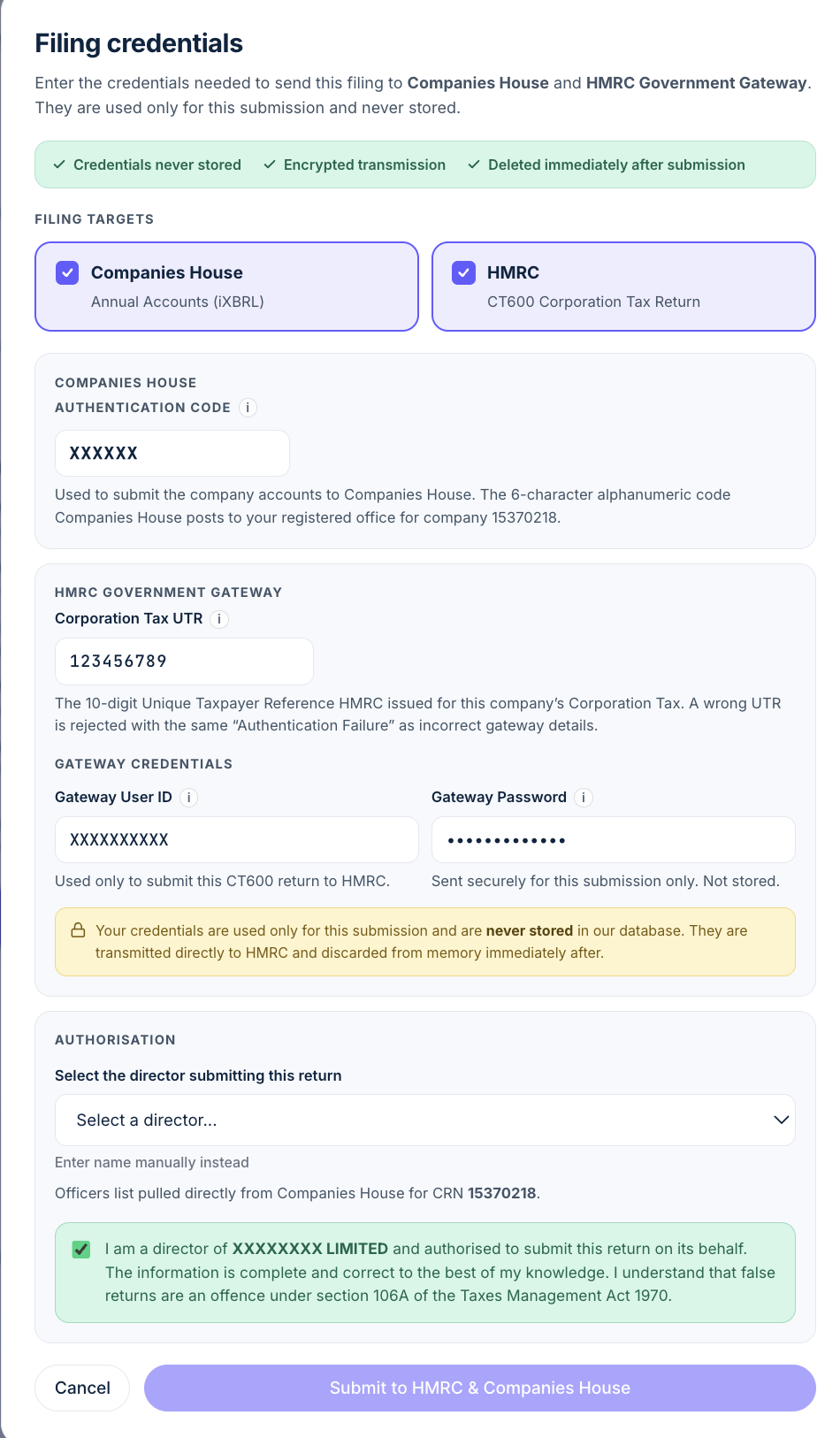
If you have already generated a preview, its Continue to submit → screen shows the destinations from that preview and locks them. To change one, select Edit filing details →on the preview page. In step 1, change What are you filing?, then return to Review and generate a new preview. Check the new documents before you submit. Your existing draft figures are preserved.
The new preview is needed because changing a destination changes which documents the platform prepares and sends. You cannot add or remove a destination on the credentials screen opened from an existing preview.
With Enter my figures once, if you have told us your Corporation Tax period is different from your accounts period, for example because the company was dormant for part of the accounts period and started trading later, that filing goes to HMRC only. File the accounts to Companies House as their own filing. See dormant at first, then trading.
There’s a third route in too. If only one side is outstanding, your company page shows a File CT600 or File Accounts action that opens the filing screen with the right target already selected.
Credentials you’ll need
After reviewing your figures and documents, open Filing credentials. Check the filing targets and enter the details needed for those destinations. Targets shown after a preview are locked to that preview. The fields depend on the selected destinations:
- Companies House: your company’s 6-character authentication code.
- HMRC: your 10-digit Corporation Tax UTR and the Government Gateway user ID and password for the account enrolled for the company’s Corporation Tax.
Confirm the declaration and select the button labelled Submit to HMRC, Submit to Companies House or Submit to HMRC & Companies House. That action starts the platform submission. Check each authority’s response on your filing record. Format checks before sending cannot guarantee acceptance by an authority.
You also confirm the director approving the accounts and the accounts approval date. That date is not a password or filing credential. It is the date the directors approved the finished annual accounts, and it appears in both the draft and final accounts. See what to enter as the accounts approval date.
For where to find each of these, and how they are handled, see “What credentials do I need to submit, and where can I find them?” in our FAQ.
Sample outcome
Not the right option?
Open the guide for the filing that matches your situation.
Looking for a different field or step? See all filing wizard guides →
Official sources
- GOV.UK: accounts and tax returns for private limited companies
- GOV.UK: Company Tax Returns
- Companies House: file your annual accounts
- GOV.UK: Corporation Tax accounting periods, accounts over 12 months
- HMRC Company Tax Return guide: boxes 80, 85 and 90
- Companies House: change a registered office address (AD01)
Whether this route matches your filings is for you to decide, yourself or with your accountant.
Example companies and figures are fictional. Field names match the filing wizard as of 12 October 2026.